

ແມ່ແບບ:Multiple image

This template creates a box with two to five images arranged vertically or horizontally with captions for the entire box and/or for each images.
Usage
[ດັດແກ້]- align defaults to "center"
- direction defaults to "horizontal"
- header_align defaults to "center"
- footer_align defaults to "left"
- width will overrides width1, width2, width3, width4, and width5. If you want each image to be different sizes, do not provide the width parameter.
- header, footer, and captions are optional.
{{multiple image
 | align     = left/right/center
 | direction = horizontal/vertical
 | header    =
 | header_align = left/right/center
 | header_background =
 | footer    =
 | footer_align = left/right/center
 | footer_background =
 | width     =
 | image1    =
 | width1    =
 | caption1  =
 | image2    =
 | width2    =
 | caption2  =
 | image3    =
 | width3    =
 | caption3  =
 | image4    =
 | width4    =
 | caption4  =
 | image5    =
 | width5    =
 | caption5  =
}}
Examples
[ດັດແກ້]

Players are cautioned with a yellow card, and sent off with a red card, which is sometimes round.
{{multiple image
 | footer    = Players are cautioned...
 | width     = 60
 | image1    = Yellow card.svg
 | image2    = Red card.svg
}}
PNG transparency demonstration

A PNG image with an 8-bit transparency layer...

...here overlaid onto a checkered background.
{{multiple image
 | align     = left
 | direction = vertical
 | header    = [[PNG]] transparency demonstration
 | width     = 200
 | image1    = PNG transparency demonstration 1.png
 | caption1  = A PNG image...
 | image2    = PNG transparency demonstration 2.png
 | caption2  = ...here overlaid...
}}
{{multiple image
 | footer   = When a user has...
 | width    = 60
 | image1   = Ribbon numeral 2.png
 | caption1 = Number 2
 | image2   = Ribbon numeral 3.png
 | caption2 = Number 3
 | image3   = Ribbon numeral 4.png
 | caption3 = Number 4
}}
Example with background color
[ດັດແກ້]


Adoxa (Adoxa moschatellina)
{{multiple image
| image1=Adoxa_moschatellina_210406.jpg
| alt1=Green herb with a few tiny yellow-white flowers

| image2=Adoxa_moschatellina_210406a.jpg
| alt2=Three small white and yellow flowers before green-leaf background

| image3=adoxa_moschatellina_blatt.jpeg
| alt3=Leaves of a plant. They are in groups of three, each with three lobes.

| footer=[[Adoxa]] (''Adoxa moschatellina'')
| footer_background=#BBDD99
| background color=#BBDD99
| footer_align=center
| width=160
}}
Example with links
[ດັດແກ້]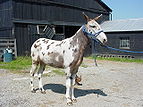
骡子, luózi
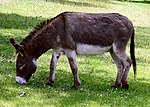
驴子, lǘzi

鱼, yú
The mule links to Mule, the donkey does not link anywhere, and the trout links to its image description page as usual.
{{multiple image
| footer    = The mule links to ''[[Mule]]'', the donkey does not link anywhere, and the trout links to its image description page as usual.
| align     = left

| image1    = Frecklesmule.jpg
| width1    = 143
| alt1      = A mule
| caption1  = <center>A mule<br />骡子, ''luózi''</center>
| link1     = Mule

| image2    = Donkey in Clovelly, North Devon, England.jpg
| width2    = 150
| alt2      = A donkey
| caption2  = <center>A donkey<br />驴子, lǘzi</center>
| link2     =

| image3    = Rainbow_trout.png
| width3    = 91
| alt3      = A trout
| caption3  = <center>A fish<br />
{{lang|zh|2=鱼}}, ''yú''</center>
}}
Horizontal placement
[ດັດແກ້]Vertical direction places the images on one column, while horizontal direction places the images on one row:
vertical


horizontal
Matching image heights
[ດັດແກ້]- This trick is not required if all images have the same aspect ratio, where
|width=suffices
- Decide on a common height for the images, say 100 pixels.
- Examine the individual image pages to obtain the full resolution. For example:
- File:Donkey in Clovelly, North Devon, England.jpg shows "Donkey in Clovelly, North Devon, England.jpg (750 × 536 pixels, file size: 125 KB, MIME type: image/jpeg)"
- File:Rainbow trout.png shows "Rainbow_trout.png (300 × 300 pixels, file size: 158 KB, MIME type: image/png)"
- For non-square images, use these figures to construct an expression for the
|widthn=parameters, of the form:{{#expr: (dh * ow / oh) round 0}}
- where
- dh is the desired height in pixels (100)
- ow is the original width in pixels (750 or 300)
- oh is the original height in pixels (536 or 300)
- For square images, simply set the appropriate
|widthn=to be the desired height. If all are square, only|width=needs to be set.

A donkey, not square and originally 536 pixels high
A fish, square and originally 300 pixels high
The two images are both rendered 100 pixels high
{{multiple image
| footer    = The two images are both rendered 100 pixels high
| align     = right

| image1    = Donkey in Clovelly, North Devon, England.jpg
| width1    = {{#expr: (100 * 750 / 536) round 0}}
| alt1      = A donkey
| caption1  = A donkey, not square and originally 536 pixels high

| image2    = Rainbow_trout.png
| width2    = 100
| alt2      = A trout
| caption2  = A fish, square and originally 300 pixels high
}}
See also
[ດັດແກ້]| ຄູ່ມືການໃຊ້ງານທີ່ສະແດງຂ້າງເທິງນີ້ແມ່ນດຶງມາຈາກ ແມ່ແບບ:Multiple image/doc (ແກ້ | ປະຫວັດ) ຜູ້ຂຽນສາມາດທຳການທົດລອງໄດ້ທີ່ກະບະຊາຍ (ສ້າງ | ຄັດລອກ) ແລະຊຸດທົດສອບ (ສ້າງ) ຂອງແມ່ແບບນີ້ ກະລຸນາເພິ່ມໝວດໃສ່ໜ້າຍ່ອຍ /doc ໜ້າຍ່ອຍຂອງແມ່ແບບນີ້ |